



USB-C to Mini DisplayPort Adapter 4K@60Hz - Graphite
About this item
Pairs well with
SAME DAY SHIPPING order by 11 AM (EST)
Free Shipping Orders Over $50
Technical Support
30 Days Return
1-Year Warranty
USB-C to Mini DisplayPort Adapter 4K@60Hz - Graphite
Product details
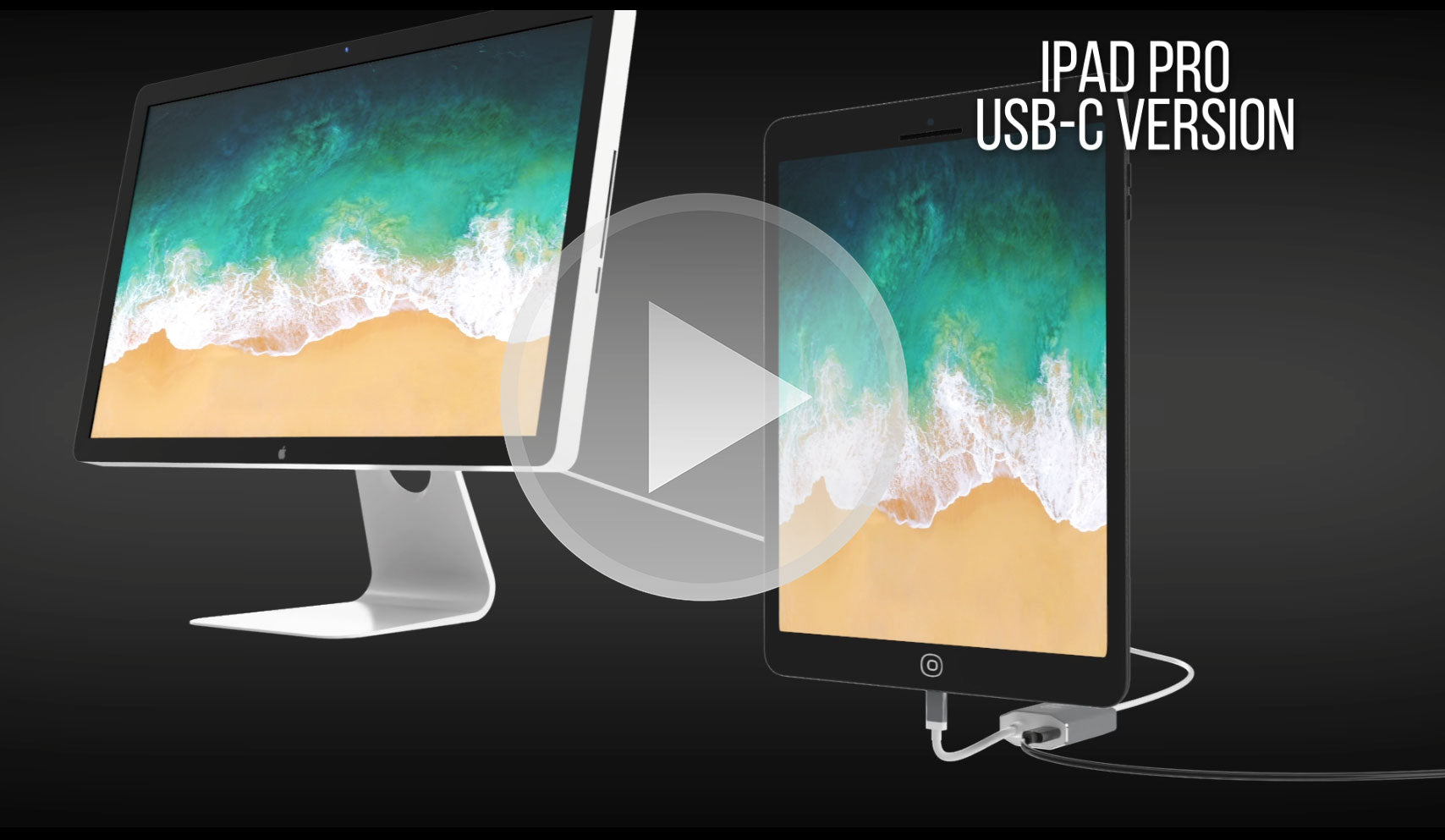
The USB-C to Mini DisplayPort Adapter is an excellent tech companion to devices like Apple MacBook Pro/Air M4, iPad Pros (2018+), Google Chromebook Pixel, Lenovo Yoga, and many more, with its fantastic Ultra HD 4K 60Hz resolution and 8-channel audio support design.
With a USB-C power delivery port, you can seamlessly power your Apple MacBook 2016+ and MacBook Pro 2016+ with Touch Bar and use the Mini DisplayPort simultaneously. The durable aluminum shell allows for improved heat dissipation to prevent overheating, and the small, compact design makes it especially travel-friendly.
Self-powered, sleek, and modern, the USB-C To Mini DisplayPort Adapter is a must-have tech accessory for those who need to connect video sources to their display device without hassle.
Highlights:
- Small, compact design
- Sleek Graphite color
- Self-powered - no external power required
- Connects to Mini DisplayPort
- Aluminum shell - excellent heat dissipation
- Power delivery pass-through for charging
- Supports Ultra HD 4K at 60Hz resolution
- Compatible with Apple MacBook, Google Chromebook Pixel, and more
- Includes on-chip microprocessor with internal SPI ROM
- Supports content protection formats HDCP 1.4 and HDCP 2.2
- HDCP 1.4 and HDCP 2.2 repeater function with on-chip keys
- Supports TMDS scrambling for EMI/RFI reduction
- Supports SCDC (Status and Control Data Channel)
- Audio support up to 8 channels LPCM
Compatible Devices:
- Apple MacBook Pro 2016/M1 and later including new 14/16" M4 Pro and M4 Max
- Apple MacBook Air 2018 and later
- Apple iPad Pro 2018 and later
- Apple iMac 2017 and later
- Apple Mac Mini 2018 and later
- Apple Mac Pro 2019
- Android Smart Phones and Tablets with USB-C
- Google Pixel
- Google Chromebooks with USB-C
- Lenovo Laptops with USB-C
- HP laptops with USB-C
- Any Computer with Thunderbolt 3
Can only convert signal from USB-C (Type-C) to Mini DisplayPort. This is not a bi-directional Adapter. This adapter is NOT compatible with Intel Thunderbolt 2. Before you purchase this adapter, please make sure your Device (Computer/Tablet/smartphone) supports HDMI/DisplayPort Alt Mode Over USB Type-C.
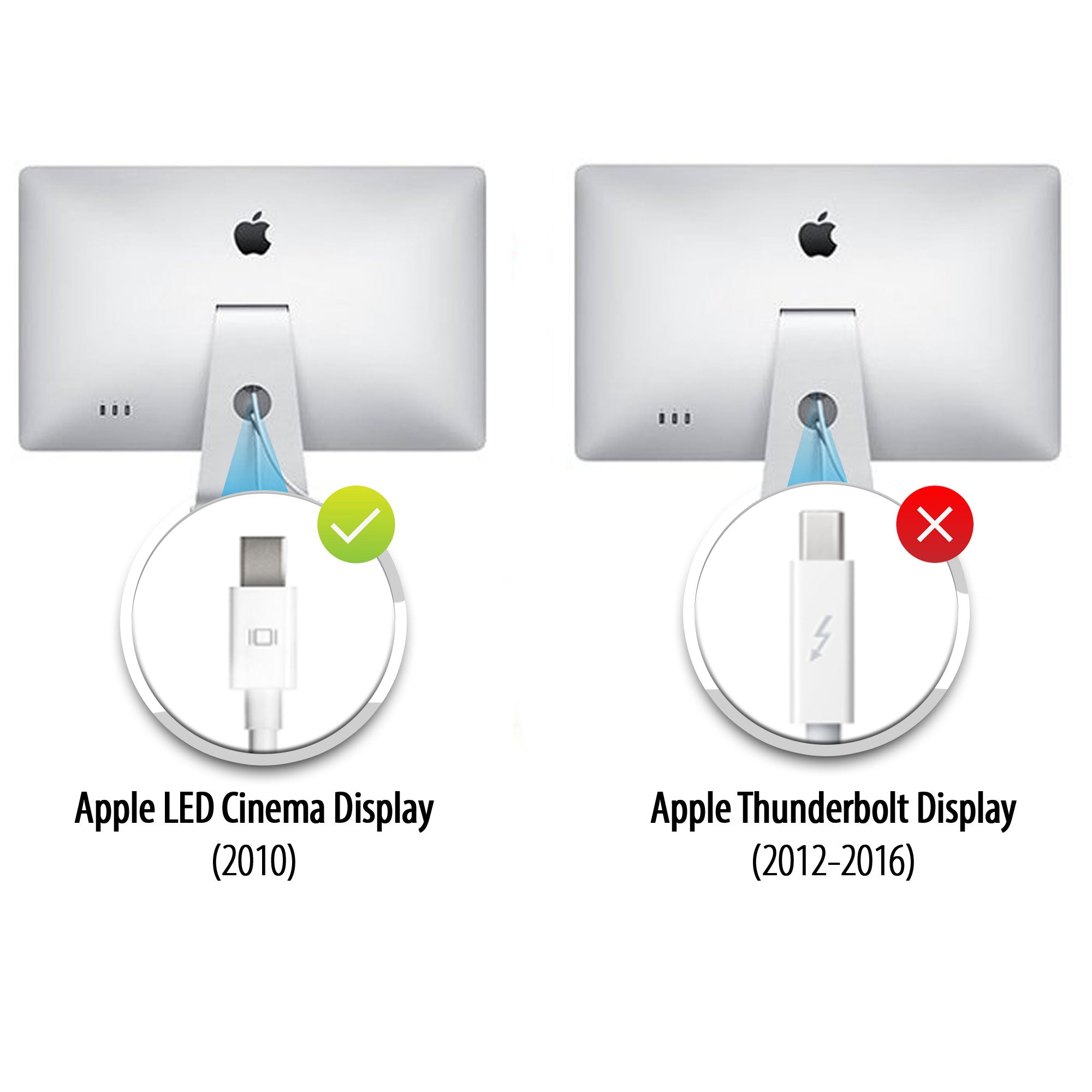
Learn how to identify whether your Apple display uses Mini DisplayPort or Thunderbolt, which Apple Cinema Displays are compatible, and how to connect them to modern USB-C and Thunderbolt laptops using the UPTab USB-C to Mini DisplayPort Adapter
Highlights:
- Small, compact design
- Sleek silver color
- Self-powered - no external power required
- Connects to Mini DisplayPort
- Aluminum shell - excellent heat dissipation
- Power delivery pass-through for charging
- Supports Ultra HD 4K at 60Hz resolution
- Compatible with Apple MacBook, Google Chromebook Pixel and more
- Includes on-chip microprocessor with internal SPI ROM
- Supports content protection formats HDCP 1.4 and HDCP 2.2
- HDCP 1.4 and HDCP 2.2 repeater function with on-chip keys
- Supports TMDS scrambling for EMI/RFI reduction
- Supports SCDC (Status and Control Data Channel)
- Audio support up to 8 channels LPCM
Compatible Devices:
- Apple MacBook Pro M1 and later including new 14/16" M4 Pro and M4 Max
- Apple MacBook Air M3 and later
- Apple iPad Pro with USB-C and later
- Apple iMac 2017 and later
- Apple Mac Mini M1 and later
- Apple Mac Pro 2019 and later
- Android Smart Phones and Tablets with USB-C
- Google Pixel
- Google Chromebooks with USB-C
- Lenovo Laptops with USB-C
- HP laptops with USB-C
- Any Computer with Thunderbolt 3 and USB 4.0
Smartphones and tablets that support video output: Full List
If you have any questions, you are always welcome to contact us. We'll get back to you as soon as possible, within 24 hours on weekdays.
-
Shipping Information
We process and ship most orders the same day. Delivery times vary based on your selected shipping method at checkout. Please ensure your shipping address is accurate to avoid delays.
-
Customer Support
Our team is here to help! For questions or assistance, contact us by email or through our contact form. We’ll get back to you as quickly as possible.
-
FAQ’s
When will my order ship?
Most orders are processed and shipped the same day. Delivery time depends on the shipping option selected at checkout.
What is your return policy?
Items may be returned within 30 days in original packaging with all accessories included. -
Contact Us
Have questions or need help? We’re here for you.
Customer Service available Mon - Fri 9am - 5pm (EST)
Email: cs@uptab.com
Phone: 1 (877) 333-1505
Or use our contact form—we’ll respond promptly.
FAQs
Frequently Asked Questions – USB-C to Mini DisplayPort Adapter
I connected the adapter but no image on my Monitor.
- There are several different reasons why video is not showing
- Your Monitor is the Thunderbolt version of Apple Cinema Display. You can check my finding the small icon on the white cable coming from your monitor. If showing a small Thunderbolt our adapter will not work, if showing a small square with two lines on the side our adapter will work as expected because your monitor is the Mini DisplayPort version of the Apple Cinema Display.
Please make sure your apple monitor is connected to power and operational.
Why I can not control the brightness, Audio, and the iSight Camera on my Apple Cinema Display?
- You must connect the USB-A Cable from your Apple Cinema Display to your Laptop to be able to control brightness, audio, and iSight Camera.
I am only getting 4K 30Hz when using the UPTab Adapter. How can I get 4K @ 60Hz?
- There are several different reasons why a 4K display would be limited to 4K 30Hz using our adapter. We would recommend first checking:
- The USB C output port must support DP1.4 ALT compliant to get 4K @ 60Hz or DP1.2 for 4K@30Hz.
- System specifications to ensure that the internal graphics processor can support 4K @ 60Hz and that the output port on the system/GPU can support 4K @ 60Hz.
Is this adapter compatible with MacBook Pro, MacBook Air, iPad Pro, and other USB-C devices?
Yes, it works with USB-C and Thunderbolt 3/4 devices such as MacBook Pro, MacBook Air, iPad Pro, Mac Mini, iMac, and many Windows laptops that support video output via USB-C.
Do I need to install drivers or software for this adapter to work?
No drivers are required. This adapter is plug-and-play, so once connected, your display should be recognized automatically.
Cinema Displays
Apple made two very similar-looking Cinema Displays, but you can tell them apart by the connector logo on the white cable:
- Apple Thunderbolt Cinema Display – The connector shows a lightning bolt symbol (⚡).
- Apple LED Cinema Display (Mini DisplayPort) – The connector shows the Mini DisplayPort logo (a square with two vertical lines on each side).
Checking this small logo on the cable is the easiest way to distinguish between the two models.
Hi,I have used UPTab USB-C to Mini Display Port Adapter with my old Mac Cinema Display. It works fine but I have no sounds in Cinema Display speakers.:-(SynReginaldo

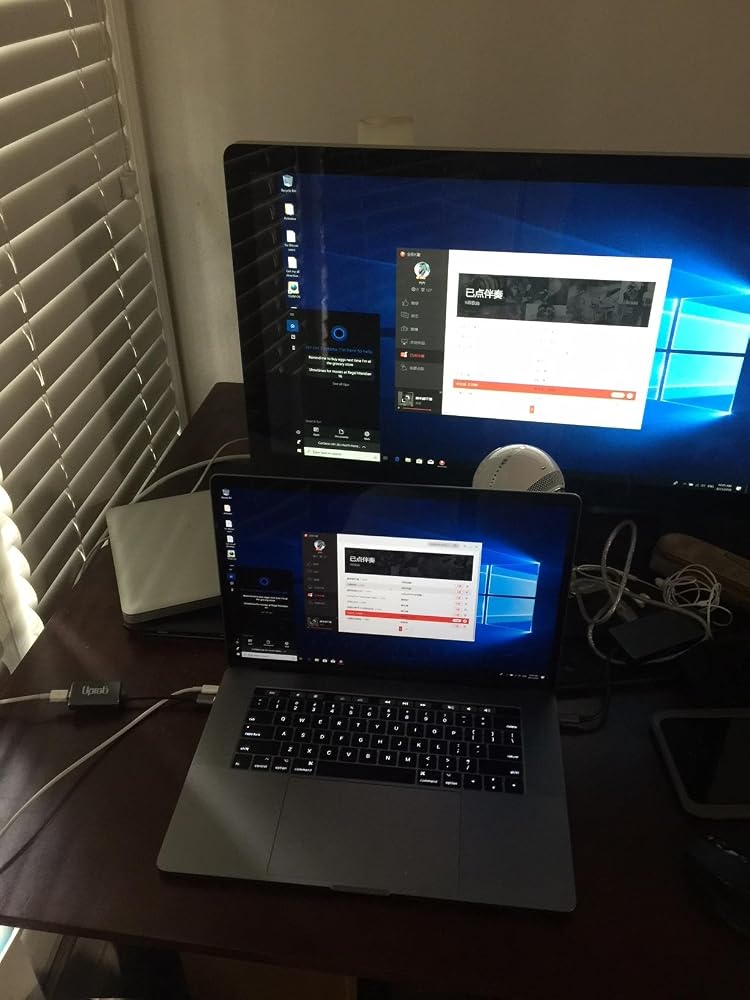
Let me first say that I'm using a 2017 Macbook Pro (thunderbolt 3) with a 2011 27-inch Cinema Display (mini displayport). These specifically are mentioned as being compatible with this adapter, and it works as advertised - see the picture (running Boot Camp / Windows 10).The description of this adapter very clearly states (and shows!) that it will work with the exact equipment I have - and it does. If you're using HDMI, DVI, 4K, LG, Dell, etc....I really have no idea about that, so good luck!
Faulty adapter, but a good resolution.
Toimii! It works!
I picked up two USB-C to Mini DisplayPort Adapter 4K@60Hz - Graphites to use my 2-27" legacy Apple Cinema Displays on my new to me 2019 Mac Pro. Shipped quickly. Well packaged. Worked from first plugging them in. I have had them a few weeks now. There is the occasional flicker or banding, but I think it may be a video card issue, not the adapters. I haven't done anything intensive yet that would eat up video card memory and RAM, but the behavior fits more with those two possibilities. I would recommend these adapters to anyone who needs to add their legacy monitors to a more current Mac without giving it a second thought. Thank you, Uptab for a reliable and inexpensive product!
Doesn‘t work.
Adapter broke after six weeks, with both Amazon and the manufacturers offering no help with a replacement. Avoid this product and Amazon.
It worked at first and pleased about it. Now, not working at all. Bought it last Aug 5 and used it for some time (coz I really seldom use it! ) for my Mac mini 2 connected to an old Apple-led cinema display. I on the computer yesterday, monitor no picture. Tried to on it again today, still the same! Shocked that it is not working at all now! Within 2+ months after I ordered it, it didn't even last longer.
Didn't work. Like, at all. Computer doesn't even see the device.
I bought this 11 months ago and it has completely stoped working. I have bought a different model and it works perfectly.
Doesn't work.
Does not work with 2017 MacBook.
I purchased for my new MacBook Pro [2016 retina with USB-C] and it did not allow 4k video on my Dell P2715Q [2015] 4k monitor. Research before you purchase if you want 4K output.
didnt work .. i have everything right and dosnt work
My display is older -- and it has the square display port symbol, so I thought this UpTab would work. Nope. I even tried using it with a newer MacDisplay (2018 I think) and nothing. Super disappointed in the product, and that I missed the return time period. UGH!
NOTE: DOES NOT SUPPORT THE CAMERA IN THE APPLE LED CINEMA DISPLAY!!!
I'm using this adapter to connect to an Apple Cinema Display LED (27-Inch) (model A1316). On startup the monitor is not detected. Sometimes tapping the fingerprint scanner to put the machine to sleep and closing and reopening the laptop lid gets the monitor to be recognized. More often, 1 or 2 reboots are required before it is detected. Also, sporadically, when waking the laptop from screensaver, the monitor resolution is magnified even though the System Settings indicate the default resolution is selected. Choosing a different resolution and changing back to default does not resolve. It's been a disappointing and frustrating experience so far..
Didn't work with my good old (11 years) Dell 3007WFP and the original Apple Mini DisplayPort to Dual-Link DVI Adapter even though advertised as if it should work with active dual link DVI, which worked just fine on my old 2014 MBP.Returned it.Time to retire the old monitor, got me an Acer widescreen 38" inch now, better fit for the new MBP anyway.
I tried to save a few bucks and buy this adapter instead of the Apple brand, and unfortunately the power passing through the adapter was insufficient to power my raid (which is also direct connected to the wall). Once I purchased the Apple version, it booted up no problem. I should have known to stick to Apple !
Didn't make it to 2 years. All of a sudden just stopped working today. I didn't use this dongle daily so 2 years might be generous? Until it stopped working it did it's job well.
Bild wird übertragen. Ton nicht. Keine Helligkeitssteuerung.
Display colors are dim, hue is off, no brightness control. Maybe something is wrong with my copy. MacBook Pro 2021 into 27” LED Cinema Display.
Successfully connects a modern USB-C MacBook Pro to the 30” Apple Cinema Display (2560×1600) if using the genuine Apple Mini DisplayPort to Dual-Link DVI adapter. Maintains full resolution and stable signal with no flicker or artifacts. Unlike many USB-C to Mini DisplayPort adapters, this one properly supports the legacy DisplayPort 1.1/1.2 timing required by the Apple Dual-Link adapter. NOTE: The StarTech USB-C to Mini DisplayPort adapter (model CDP2MDPEC), while similar in spec, did not work in this setup. External USB power (5V 2A or higher) must be supplied to the Dual-Link adapter for the system to function. Confirmed working with macOS Sequoia 15.5 on Apple Silicon.
I don't write reviews but thought I must for this product. It does work. I does allow me to hook up my old Apple Cinema Display to my new MacBook Pro. I will give it that. But the auxiliary outlet has never worked. Also, the display doesn't always turn on when it should. I need to reboot it by unplugging/plugging it back in, Frustratingly so.
Adapter is able to connect to Macbook Pro M1 Max to Apple cinema HD 30 from 2008, using the apple double link DVI to DisplayPort adapter.
The adapter works fine with my 5th-generation iPad Air and a 24" Apple LED Cinema Display. It turned the older display into a nice setup for easier editing of my travel videos.
This worked great for my setup and it display images crystal clear. This worked for my 2019 Macbook Air and Apple Monitor. I plugged in my monitor to this adapter and the USB-C end to my macbook and it worked great !
I have a 2023 MacBook Pro 14" M2 and a 27" LED Cinema display and everything works great BUT I cannot adjust the brightness. And yes, I have both this adapter plugged into the mini display port and the USB plugged in from the Cinema display's 3-wire cable. I've also set the preference to manually adjust the brightness on my laptop to manual and it works fine on the laptop but has no effect on the 27" display. It's not the worst problem but I would like to lower the brightness at times.
Liked the power + video capabilities but after 6mos it failed both power and video.
I got this to use an older Apple Cinema Display with an M1 Max MacBook Pro since apples adapters don’t allow this to work and this adapter 100% got the job done.
Free Shipping Over $50
Same-Day Shipping on Most Orders